IPv4
From $0.50 for 1 pc. 38 countries to choose from, rental period from 7 days.
IPv4
From $0.50 for 1 pc. 38 countries to choose from, rental period from 7 days.
IPv4
From $0.50 for 1 pc. 38 countries to choose from, rental period from 7 days.
IPv6
From $0.07 for 1 pc. 14 countries to choose from, rental period from 7 days.
ISP
From $1.35 for 1 pc. 23 countries to choose from, rental period from 7 days.
Mobile
From $14 for 1 pc. 17 countries to choose from, rental period from 2 days.
Resident
From $0.70 for 1 GB. 200+ countries to choose from, rental period from 30 days.
 Armenia
 Australia
 Belgium
 Brazil
 Bulgaria
 Canada
 China
China
 Czech
Czech
 England
 Finland
 France
 Georgia
 Germany
 Hong Kong
 India
India
 Indonesia
 Italy
Italy
 Japan
Japan
 Kazakhstan
 Korea
Korea
 Latvia
 Lithuania
 Malaysia
 Mexico
 Netherlands
 Poland
 Portugal
 Romania
 Russia
 Singapore
 South Africa
 Spain
Spain
 Sweden
 Switzerland
 Thailand
 Turkey
 Ukraine
 USA
USA
Use cases:
Armenia
Australia
Belgium
Brazil
Bulgaria
Canada
China
Czech
England
Finland
France
Georgia
Germany
Hong Kong
India
Indonesia
Italy
Japan
Kazakhstan
Korea
Latvia
Lithuania
Malaysia
Mexico
Netherlands
Poland
Portugal
Romania
Russia
Singapore
South Africa
Spain
Sweden
Switzerland
Thailand
Turkey
Ukraine
USA
Use cases:
Tools:
Company:
About Us:
Armenia
Australia
Belgium
Brazil
Bulgaria
Canada
China
Czech
England
Finland
France
Georgia
Germany
Hong Kong
India
Indonesia
Italy
Japan
Kazakhstan
Korea
Latvia
Lithuania
Malaysia
Mexico
Netherlands
Poland
Portugal
Romania
Russia
Singapore
South Africa
Spain
Sweden
Switzerland
Thailand
Turkey
Ukraine
USA
Kameleo is a browser designed for users who need privacy, data protection, or multi-profile management. It allows each browser session to appear as a separate device by simulating unique fingerprints. To extend its functionality, the browser allows users to configure a Kameleo proxy.
Such an intermediary masks your IP address and routes your traffic through a different one, providing better privacy, security, and greater control over online activities. This article explains how this tool integrates proxies, why they’re important, and how to set them up step by step.
Kameleo browser does not come with built-in intermediaries. Instead, it lets users connect to third-party providers. Each browser profile can be assigned a separate IP address using a Kameleo proxy, allowing every session to appear unique.
This process plays a critical role in reducing detection risks and preventing links between multiple accounts.
This solution allows users to manually configure a new IP during profile setup. Once added, the intermediary routes all traffic for that session through a new IP address, different from your local network. This ensures that websites, platforms, or tracking systems see only the assigned IP - not your real one.
It also includes an AI Mode that adjusts browser characteristics to match the environment associated with the selected profile. When used with a Kameleo proxy, the AI Mode helps maintain consistency between the browser fingerprint and the visible IP address, reducing mismatches that could lead to detection.
A properly configured Kameleo proxy hides your actual IP address. This makes it more difficult for websites to track your behavior across sessions or link multiple profiles together.
Proxies allow you to select IP addresses from different regions, enabling access to region-locked websites or services by routing traffic through approved locations.
With separate profiles and proxies, each account can be operated under a different IP and device configuration. This separation helps reduce account verification challenges caused by repeated logins from the same network or device.
Many scraping tasks involve sending multiple requests. Proxies enable IP rotation, improving stability and minimizing connection errors. When combined with the tool's profiles, this makes scraping more stable and scalable.
To begin using a Kameleo proxy, you’ll need access to a server. This may be a private or commercial server that supports one of the accepted protocols: HTTP(S), SOCKS5, or SSH. Once you have the necessary IP address, port number, and (if required) login credentials, follow these steps:
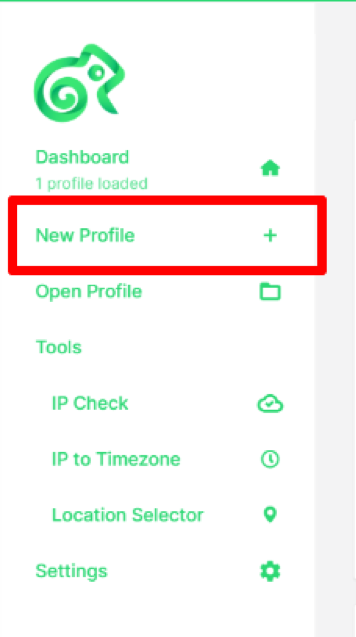
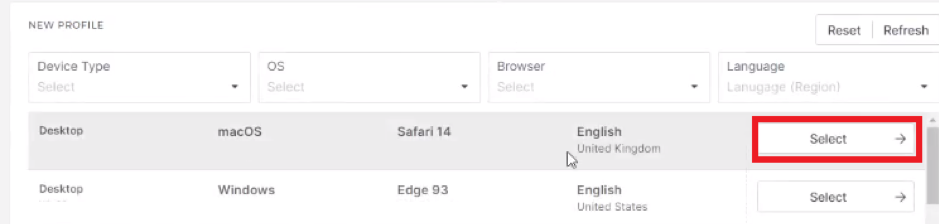
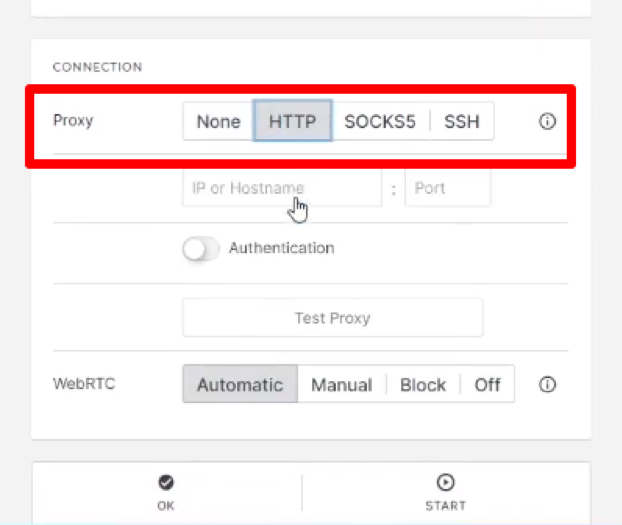
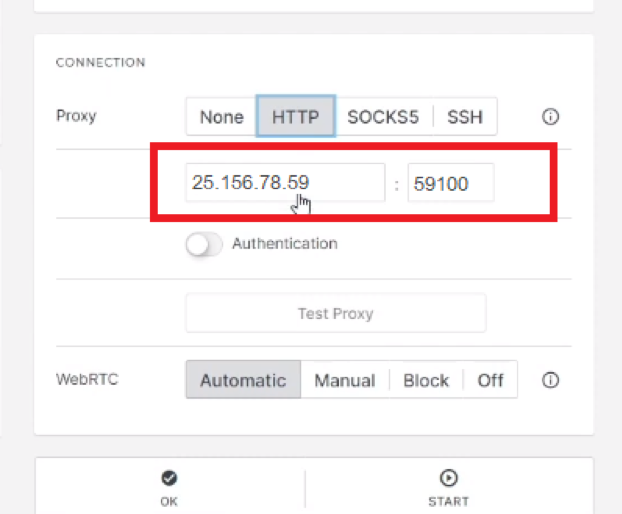
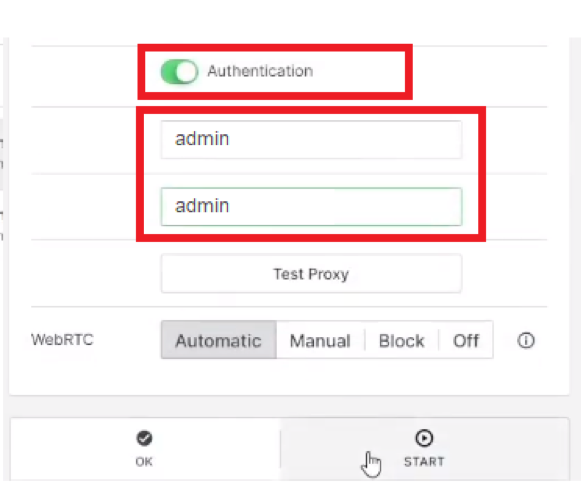
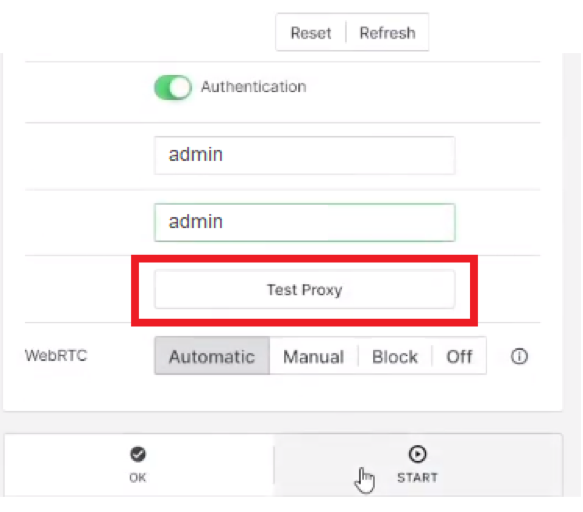
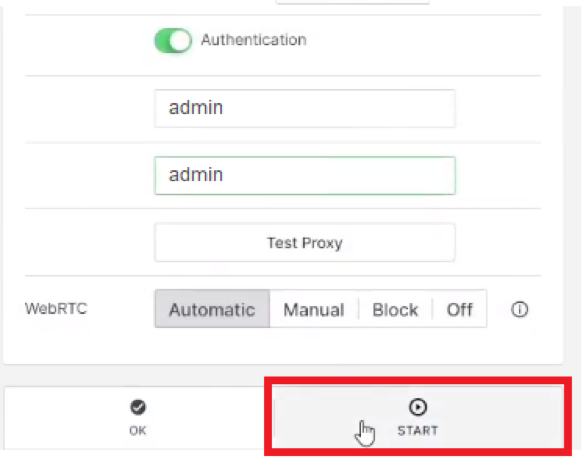
This setup ensures that your session runs through the specific IP, masking your real one and keeping your activities separate from your actual location or device.
Such a solution becomes significantly more powerful when used with intermediaries. While the application does not offer its own network, it integrates seamlessly with external providers. This allows users to maintain unique sessions across multiple profiles while preserving privacy and avoiding restrictions.
Assigning a new IP to each browser profile gives users full control over how their data is accessed and viewed online. For activities like managing multiple accounts, collecting data, or accessing region-specific websites, using the correct solution is essential.
To get the best performance and protection, always select high-quality, private Kameleo proxies. These offer stable connections, authenticated access, and lower detection rates – ensuring your setup runs smoothly every time.
 Instagram
  Facebook
  TikTok
  Telegram
  YouTube
  Twitter
  Tinder
  Reddit
  LinkedIn
  Runescape
  Dofus
Dofus  Metin2
  Silkroad
  Margonem
  Minecraft
  Lineage 2
  WoW
WoW  Lords Mobile
  Travian
  Steam
Steam  Origin
  Google
  ScrapeBox
  Amazon
  Ebay
Ebay  Shopify
  Etsy
Etsy  Netflix
  Spotify
  Twitch
  Browsing