IPv4
From $0.50 for 1 pc. 38 countries to choose from, rental period from 7 days.
IPv4
From $0.50 for 1 pc. 38 countries to choose from, rental period from 7 days.
IPv4
From $0.50 for 1 pc. 38 countries to choose from, rental period from 7 days.
IPv6
From $0.07 for 1 pc. 14 countries to choose from, rental period from 7 days.
ISP
From $1.35 for 1 pc. 23 countries to choose from, rental period from 7 days.
Mobile
From $14 for 1 pc. 17 countries to choose from, rental period from 2 days.
Resident
From $0.70 for 1 GB. 200+ countries to choose from, rental period from 30 days.
 Armenia
 Australia
 Belgium
 Brazil
 Bulgaria
 Canada
 China
China
 Czech
Czech
 England
 Finland
 France
 Georgia
 Germany
 Hong Kong
 India
India
 Indonesia
 Italy
Italy
 Japan
Japan
 Kazakhstan
 Korea
Korea
 Latvia
 Lithuania
 Malaysia
 Mexico
 Netherlands
 Poland
 Portugal
 Romania
 Russia
 Singapore
 South Africa
 Spain
Spain
 Sweden
 Switzerland
 Thailand
 Turkey
 Ukraine
 USA
USA
Use cases:
Armenia
Australia
Belgium
Brazil
Bulgaria
Canada
China
Czech
England
Finland
France
Georgia
Germany
Hong Kong
India
Indonesia
Italy
Japan
Kazakhstan
Korea
Latvia
Lithuania
Malaysia
Mexico
Netherlands
Poland
Portugal
Romania
Russia
Singapore
South Africa
Spain
Sweden
Switzerland
Thailand
Turkey
Ukraine
USA
Use cases:
Tools:
Company:
About Us:
Armenia
Australia
Belgium
Brazil
Bulgaria
Canada
China
Czech
England
Finland
France
Georgia
Germany
Hong Kong
India
Indonesia
Italy
Japan
Kazakhstan
Korea
Latvia
Lithuania
Malaysia
Mexico
Netherlands
Poland
Portugal
Romania
Russia
Singapore
South Africa
Spain
Sweden
Switzerland
Thailand
Turkey
Ukraine
USA
Cloudflare error code 1010 indicates that the service itself is blocking the connection at the request validation stage. For website owners, this means losing traffic. For developers and automation systems, it breaks scraping, API calls, and integrations. The main difficulty is that without understanding how cloud service filters traffic, it’s hard to pinpoint the root cause and remove the block.
Below we’ll break down what Cloudflare error 1010 means, which scenarios trigger it, and how to fix the issue for different types of users.

Error 1010 is an internal Cloudflare code that signals the connection was rejected before the request even reached the origin server. It isn’t part of the standard HTTP status codes and isn’t caused by hosting, application code, or DNS issues.
Cloud service returns 1010 as part of the Browser Integrity Check (BIC) workflow – a built-in system that scores each call. Right after a client connects, Cloudflare evaluates whether:
If the request fails this validation or appears atypical, cloud service immediately terminates the connection, does not forward it to the origin, and shows a page with error code 1010.
Let’s look at the most common reasons behind the error for different categories of users.
When a user opens the site, they see a Cloudflare block page instead of the content. A message with code 1010 and the label “Access Denied” appears on the screen. In some cases a Ray ID and IP address also appear so the website owner can identify the rejected request.
Possible browser-side causes:
The exact reason is hidden, but in many cases adjusting browser and network settings is enough to restore access.
Admins usually don’t notice error 1010 immediately. It often surfaces after user complaints or a spike in firewall triggers in the Firewall Events section of the Cloudflare dashboard. Sometimes the problem appears during internal testing: scripts fail validation, and even admin users can’t open certain pages.
Typical configuration-related causes:
As a result, the filter blocks not only external threats but also internal services and trusted users.
Error may appear while testing interfaces, APIs, or automated scenarios – especially in headless mode or from a development environment. In these cases, the error often manifests indirectly: the call fails, and the client receives a denial without clear context, particularly if the developer has no access to the dashboard.
Possible reasons:
Even when working with your own site, Cloudflare can classify the connection as a threat and terminate it before it reaches the origin.
When a script or tool sends a call, it might receive a 403 status instead of the expected data. That external 403 response often hides an internal Cloudflare 1010 decision. Depending on how the client processes responses, the error may arrive as JSON with an explanation or as an HTML page. Logs tend to fill up quickly with these responses, especially if requests repeat frequently from the same IP.
Common causes:
In such cases, cloud service flags the client as a bot or scanner and the BIC module ends the session preemptively.
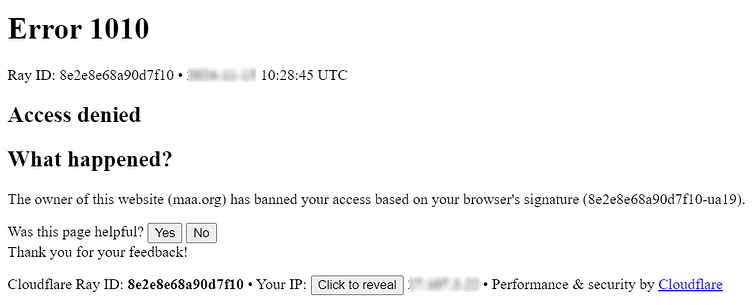
Error occurs during validation, so refreshing the page or resubmitting the form doesn’t help. To remove the root cause, you need to either adjust the client behavior or modify the filtering rules, depending on who initiates the call.
If Cloudflare error code 1010 disrupts parsers, scrapers, or API clients, refer to the material on interacting with Cloudflare-protected sites, which describes compliant methods for working with such resources.
Error code 1010 means that the platform has classified the traffic as suspicious. To reduce the risk of such blocks, it’s important to use stable solutions and a predictable, well-configured network stack.
One practical way to mitigate the problem is to purchase solutions from our service. We provide Google proxy services, social networks, marketplaces, games, and other popular platforms. You can also choose between IPv4, IPv6, mobile, ISP, and residential proxies.
Yes. You can adapt client behavior: emulate typical user actions, configure headers correctly, and use reliable proxies that support JavaScript and cookies.
Signals include missing cookies, disabled JavaScript, repetitive or simplified headers, an excessively high request rate, unusual User-Agent strings, or traffic from high-risk IP ranges.
Cloudflare evaluates technical and behavioral signals to decide how typical a client looks. Atypical fingerprints – for example, from a headless browser – increase the chance of being blocked.
Reduce suspicious indicators: vary headers, emulate user actions, tune request timing, and connect through clean, reputable proxies.
In the Cloudflare dashboard, go to Security → Events. This section shows logs of rejected connections with IPs, methods, User-Agent strings, and the reason for error 1010.
 Instagram
  Facebook
  TikTok
  Telegram
  YouTube
  Twitter
  Tinder
  Reddit
  LinkedIn
  Runescape
  Dofus
Dofus  Metin2
  Silkroad
  Margonem
  Minecraft
  Lineage 2
  WoW
WoW  Lords Mobile
  Travian
  Steam
Steam  Origin
  Google
  ScrapeBox
  Amazon
  Ebay
Ebay  Shopify
  Etsy
Etsy  Netflix
  Spotify
  Twitch
  Browsing