IPv4
From $0.72 for 1 pc. 37 countries to choose from, rental period from 7 days.
IPv4
From $0.72 for 1 pc. 37 countries to choose from, rental period from 7 days.
IPv4
From $0.72 for 1 pc. 37 countries to choose from, rental period from 7 days.
IPv6
From $0.07 for 1 pc. 14 countries to choose from, rental period from 7 days.
ISP
From $1.35 for 1 pc. 23 countries to choose from, rental period from 7 days.
Mobile
From $14 for 1 pc. 18 countries to choose from, rental period from 2 days.
Resident
From $0.70 for 1 GB. 200+ countries to choose from, rental period from 30 days.
Use cases:
Use cases:
Tools:
Company:
About Us:
Rotating proxies stop being “just IPs” the moment you run real workflows: web scraping, uptime checks, ad verification, or account ops. Small teams feel this first. Because every extra retry, block, or flaky session turns into wasted hours (and a bigger proxy bill). In 2026, most rotation stacks lean on rotating residential IPs, and mobile proxies for stricter targets and sensitive flows. This shortlist focuses on the best rotating proxy vendors and what actually moves the needle.
Below, I broke down what actually matters when you buy: rotation controls (time/request/sticky), session stability, geo depth (city/ASN/ISP), protocol/auth support, and pricing mechanics that decide your real cost per successful request.
Rotating proxy servers can help even with small one-off tasks–like checking how a site looks from another country, verifying regional pricing, or running a short bulk browsing session without tying everything to one IP. For most everyday needs, a simple setup is enough, and you won’t need deep targeting or complex controls.
At scale, automation changes the rules. Akamai reports bots make up 42% of overall web traffic, and 65% of that bot traffic is malicious. F5 also says bots now access some web content more than humans, driven by generative AI providers. This pressure pushes sites toward tighter throttling and stricter browsing run checks.
That’s where rotating proxies earn their keep. LLM enrichment, web scraping, testing/monitoring, and ads/account ops run at higher volume and across more locations. They break faster when sessions turn flaky or exits drift. Residential IPs cover most workloads and keep costs predictable. Cellular solutions fit stricter flows that react to carrier signals.
If you run lead enrichment, vendor intelligence, or RAG refreshes, you hit many domains. Defenses vary a lot across them. Rotation keeps your pipeline moving when one IP reputation would stall the job. Aim for high success rates and stable browsing run for multi-step fetches. Think pagination, redirects, and chained requests.
This is the classic “many pages, many sites, many retries” workload. The best rotating proxy helps you avoid burning a single exit. They also cut downtime from throttling and soft blocks. Most teams start with residential as the default. Use mobile only for a handful of truly hard targets. Check also the listicle: best web scraping proxy.
Use rotation for uptime checks, localization QA, and multi-region monitoring. It gives you multiple vantage points without running your own distributed stack. But don’t let rotation add randomness everywhere. Too much rotation will make baselines noisy and harder to trust.
Ads verification, account tools, and logged-in flows break fast when exits change mid-session. Rotating IPs still help, but you need strong sticky IP browsing run control. You also want a clean reputation footprint across exits. Mobile often helps when platforms tighten checks and carrier signals matter.
A rotating proxy service can look “good” on paper and still fail under real load. Providers often advertise similar proxy pools, but you feel the difference in session behavior, geo accuracy, and how fast you can debug failures.
Here’s what to evaluate before you pick best rotating proxy provider from the top list:
Look for rotation modes that match your traffic shape. You want per-request rotation for stateless pulls, time-based rotation for controlled browsing patterns, and sticky sessions for multi-step flows. Good providers let you set or influence session TTL and reuse exits with session IDs. Weak providers lock you into one mode and force retries. By the way, for some activities there will be enough static solutions, check this “Static vs Rotating Proxies” article.
Session stability decides whether your workflow completes cleanly. Ask how sticky sessions behave at higher concurrency and over longer runs. Watch for “silent reshuffles” where an exit changes mid-flow. That breaks logins, carts, and chained requests. You also want clear limits on concurrent browsing runs and connection caps.
Country targeting is baseline. For serious work, you need city-level targeting and, on stricter targets, ASN/ISP targeting. More importantly, you need repeatability. A provider should deliver consistent results across runs from the same geo. If geo “drifts”, your monitoring and QA become unreliable.
At minimum, you want HTTP(S) + SOCKS5 support. For auth, look for user/pass and IP allowlisting. If multiple tools or people touch the setup, auth flexibility prevents messy credential sharing. It also reduces outages during redeployments and IP changes.
“From $X/GB” or “from $Y/IP” doesn’t tell you your real cost. Your spend depends on payload size, retry rate, IP rotation behavior, and geo premiums. Compare providers by cost per successful request, not headline pricing. Also check how the vendor bills failed attempts and whether throttling triggers hidden retry multipliers.
Rotating IPs fail for predictable reasons: blocks, throttling, timeouts, and session drops. You need dashboards or logs that show errors by target and geo, plus quick ways to rotate, replace, or retune. Fast support and clear replacement policies matter more than fancy marketing claims.
If a provider delivers predictable rotation on the IP type you actually need, residential or mobile, you’re in a good spot to choose from the 5 best rotating proxy providers. Strong controls, clear limits, and fast replacements matter more than any pool-size headline.
Below are five vendors I’d shortlist after comparing offerings side by side. I looked specifically at residential and mobile options, since that’s what most real workloads run on in 2026.
If you want the best rotating proxy for a small team, this section helps you pick faster. I’ll keep it practical: what stands out, where each provider wins, and what user feedback suggests you should watch for.

When I reviewed Geonix specifically for rotating solutions, two things stood out right away: the pricing structure and the control surface. Their residential plans start at $3/GB, but large enterprise volumes can push the effective rate down to ~$0.70/GB. That pricing ladder makes a difference when retries and payload size start driving real spend.
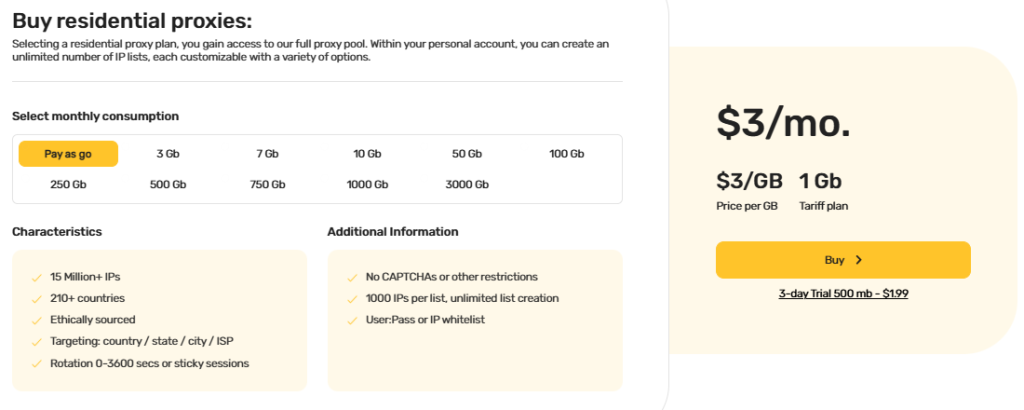
On the product side, Geonix supports the best rotating proxy types: residential and mobile. So you can cover both “wide coverage” jobs and stricter session-heavy flows. This one might be one of the best proxy providers for rotating residential IPs that fits most scraping, enrichment, and geo checks. Mobile adds another option when a target reacts harder to carrier signals and browsing run stability.

UI note: Geonix offers a clean dashboard and an easy-to-use client area, so setup and management stay simple.
Advantages
Potential drawbacks

They focus on “knobs and visibility” more than hype. Their rotating residential product supports time-based rotation, per-request rotation, and sticky mode. It also offers GEO plus ISP-level targeting, which helps when a target behaves differently by network.
On pricing, I’d read their “from” numbers as volume benchmarks, not what most small teams pay on day one. In practice, entry usage tends to land closer to ~$3/GB, while bigger contracts can push rates down toward ~$0.70/GB. They offer a low-risk entry point too: a 3-day trial for $1.99 with 500 MB of traffic. It is enough to validate rotation behavior on real targets.
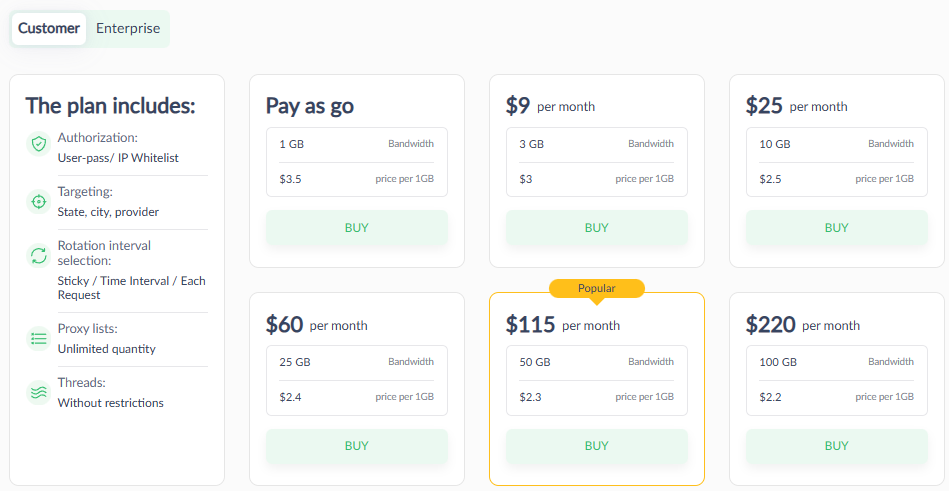
For rotating mobile, pricing depends on the allocation model. Shared options start at $10/IP, while dedicated proxies start at $25+. That split matters if you care about isolation and steadier behavior during sensitive flows.

Advantages
Potential drawbacks

The next one is Decodo (formerly Smartproxy), I noticed a very “productized” rotating stack. They push two lanes in parallel: residential for broad coverage and mobile for stricter flows. On residential, they highlight a large pool with wide geo coverage, plus HTTP(S) + SOCKS5 and both rotating and sticky modes. They also advertise deeper targeting like country/state/city/ZIP and ASN-level options, which helps when targets react differently by network.
Browsing run control is a big part of the pitch. Decodo makes sticky behavior explicit, which matters for stateful flows. Their docs show sticky presets of 1, 10, 30, or 60 minutes, plus a custom duration up to 24 hours (with a default around 10 minutes). That’s the difference between “rotation works” and “rotation breaks step two”.
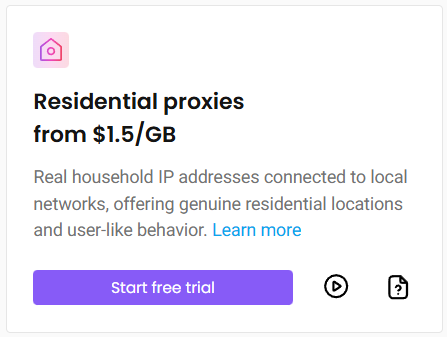
On mobile, Decodo positions a separate pool with broad location coverage and carrier/ASN diversity. They also mention city-level targeting, which you don’t always get as clearly on mid-tier providers. Overall, it reads like a platform designed for teams that want both rotation and predictable sessions, not just raw pool access.
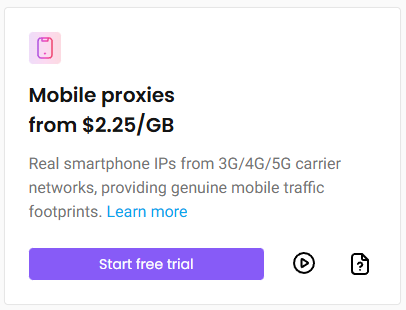
Starting prices (before discounts): residential: from $3.5/GB (+ VAT, billed monthly). mobile: from $4.0/GB (+ VAT, billed monthly)
Advantages
Potential drawbacks

When I checked Oxylabs for their best rotating proxy solutions, the positioning felt more “platform-first” than “cheap bandwidth”. They market a very large network (they cite 177M+ IPs across 195 countries) and they publish performance-style stats like 99.82% success rate and 0.41s response time on the residential page.
For residential, Oxylabs offers a pay-as-you-go option and highlights free geo-targeting and unlimited concurrent sessions on the plan cards.
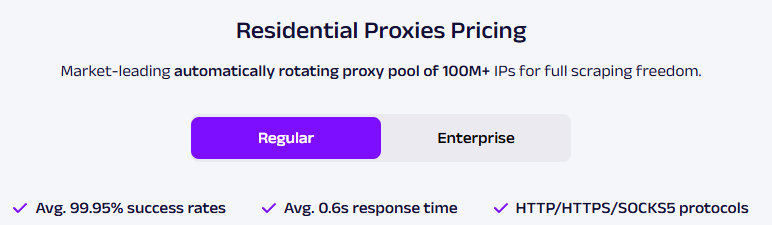
For mobile, they emphasize automatic rotation (new IP per request), 30-minute sticky sessions, and geo targeting that goes as deep as city/ASN (they claim 140+ countries).
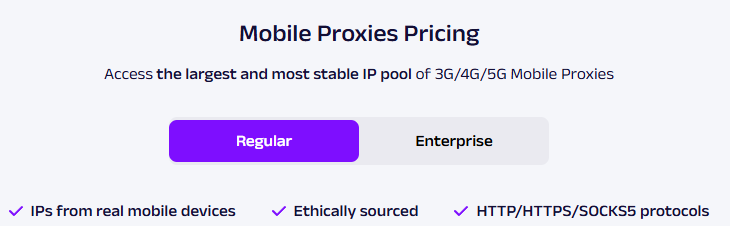
Starting prices: Residential (PAYG): $8/GB (no commitment), Mobile (PAYG): $9/GB (no commitment).
Advantages
Potential drawbacks

As for SOAX, I noticed one clear idea. They sell one plan that covers both residential and mobile, plus related tools. They also lean into targeting depth and rotation control, not “cheap GB”. SOAX lists 155M+ residential IPs and 33M+ mobile IPs, with coverage across 195+ countries.
SOAX bundles sticky and rotating browsing runs into every plan. It also includes customizable IP refresh rate and targeting down to country/region/city/ISP. One detail worth knowing upfront: SOAX caps the refresh window for mobile and residential at up to one hour between IP changes. That works for most rotating use cases, but it won’t fit very long “sticky” needs.
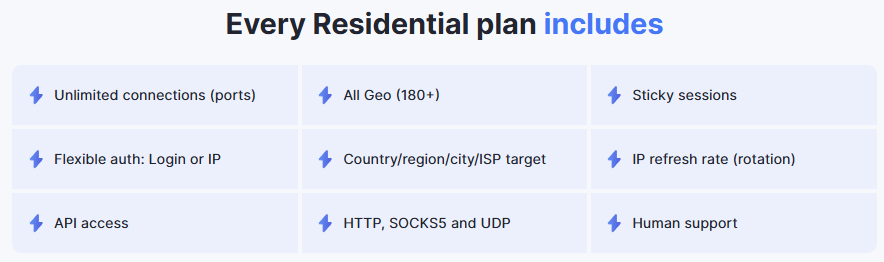
Starting prices: $90/mo (25 GB), ($3.60/GB), billed monthly. Residential and mobile plans have the same pricing structure. Trial: 3-day, 400MB for $1.99.
Advantages
Potential drawbacks
Below is a quick, buyer-style price snapshot for the best rotating proxy shortlist. I’m using public “starting” prices from provider pages, and I treat promos as optional.
| Provider | Residential (start + trial) | Mobile (start + trial) | My notes |
|---|---|---|---|
| Geonix | From $3/GB on smaller tiers (can go as low as $0.70/GB on large volumes).Trial: $1.99 / 500MB | From $14 (per proxy; 2-day minimum) | I’d pick this when I want strong value per GB and a clean, easy-to-operate dashboard. |
| Proxy-Seller | Starter pricing depends on the package (your baseline: ~$3/GB, with big orders going lower).Trial: 3 days, $1.99 / 500MB | From $10/IP (shared; dedicated options cost more) | I’d use it when I want lots of formats (shared vs dedicated) and a low-friction short trial. |
| Decodo | $6/GB (2GB plan, list price). Trial: 3-day free trial period 100MB | $7.5/GB (2GB plan, list price) Trial: 3-day free trial period 100MB | I see it as a “toolbox” pick when I want a mature product stack and quick trial access. |
| Oxylabs | $8/GB pay as you go. Trial: not available | $9/GB pay as you go. Trial: not available | I treat it as a premium choice when I care more about the enterprise process than entry price. |
| SOAX | Credit-based pricing: $3.60/GB on the 25GB starter ($90/mo). Trial: 3-day with 400 MB traffic for $1.99 | Same credit pool applies (you allocate credits across proxy types).Trial: 3-day with 400 MB traffic for $1.99 | I like it when I want one wallet to cover multiple proxy types without juggling separate plans. |
Note: Units differ by product. Some mobile offers prices per IP, others per GB. Always map pricing to your real “cost per successful request”.
These are my real-world notes from using each provider. I focus on failure modes, not features. If something broke, I would explain how I fixed it.
I ran a local SEO tracker for a small agency. The job pulled SERP snapshots across 20 cities, twice a day. Residential did the heavy lifting, because I needed geo realism, not raw speed. The first issue wasn’t bans. It had inconsistent geo results. Two “same city” runs returned different layouts and local packs.
I fixed it by tightening the location rules and reducing randomness in the run. I also switched to stickier sessions for the request chain that loads map modules. After that, the outputs stabilized, and the diff noise dropped fast. What I liked most was the ops experience. The dashboard made it easy to manage the setup without extra glue scripts. The pricing model also stayed predictable while I scaled the city list.
Spend snapshot: ~200 SERP requests/day across 20 cities; ~10–12 GB/month; ~$30–$36/month on residential.
I used Proxy-Seller for ad preview checks across a few regions, plus a light multi-account workflow. Residential rotation worked for simple preview pages, but account-like flows started failing mid-run when I rotated too often. The failures looked random until I grouped requests by flow stage and slowed rotation.
For the sensitive steps, I tested mobile. Shared worked, but it felt “noisier” under load. Dedicated solutions behaved more consistently, but the cost jump made me think twice. The good part: Proxy-Seller gives you many knobs, including ISP targeting, so you can debug traffic patterns instead of guessing. The downside: you will spend time tuning rotation rules per target. The trial helps you validate fit quickly.
Spend snapshot: ~6–8 GB residential during the run (~$18–$24 baseline) + mobile test: 1 shared IP ($10) vs 1 dedicated IP ($25+) for A/B.
I set up a monitoring job for new postings on a few job boards. The run polled categories, then followed detail pages, then saved structured fields. Rotating residential handled the breadth well, but the detail fetches started failing when sessions changed during redirect chains. Sticky presets helped here. I picked a sticky window that matched the fetch sequence and stopped breaking the flow.
The setup felt polished, and session controls felt explicit. That part helped a small team move faster. The trade-off was the budget. Entry pricing at small tiers felt expensive once retries kicked in, and VAT added extra math. Decodo worked best when I treated it as a “toolbox” vendor and kept the workload scoped and measured.
Spend snapshot: ~500–800 requests/day; ~10–15 GB/month; ~$60–$90 + VAT on small-tier residential pricing (before discounts).
I ran a brand monitoring sweep across marketplaces and public pages. I cared about clean completion more than lowest cost. Oxylabs worked well when I ran the job like an ops pipeline: defined concurrency caps, tracked success rate per domain, and watched cost per successful page.
The first pain point was not stability. It was spent. PAYG pricing makes budgeting easy to start, but it can climb fast when payload sizes grow. Cellular traffic adds pressure even faster. Oxylabs felt like a premium lane that makes sense for strict targets or higher-stakes monitoring. For small, irregular runs, it can feel like overbuying.
Spend snapshot: ~40–60k pages/month; ~30–45 GB; ~$240–$360 on residential PAYG (at $8/GB), plus mobile if you route strict targets there.
I used SOAX for multi-geo content verification on marketing pages. I liked the “one wallet” model because it simplified procurement for a small team. I could run residential and mobile use cases without juggling separate plans.
The main constraint showed up in rotation timing. The refresh ceiling pushed me to design the workflow around session windows. I grouped checks into batches and avoided patterns that needed very long stickiness. Once I worked with that constraint, the runs behaved predictably. SOAX felt best when I wanted broad geo coverage and simple plan management, not ultra-fine browsing run control.
Spend snapshot: ~15 geos × 4 pages × daily checks; ~5–8 GB/month; ~$18–$30 effective spend at starter-level $/GB.
This best rotating proxy providers shortlist shows one simple thing: providers may sell the same core idea–rotating residential and mobile IPs–but they implement it very differently. You’ll see big gaps in rotation control, browsing run stability, targeting depth, and how predictable the service feels under real workloads.
Pricing also isn’t comparable at a glance. Some vendors optimize for low entry cost, others push volume-based economics, and mobile can come as $/GB or per-IP. That’s why the “right” choice depends less on the headline rate and more on what you need to ship: stateless data extraction, geo validation, monitoring baselines, or session-heavy flows.
If you take one takeaway from this best rotating proxy guide, make it this: test with your real targets, then pick the provider whose rotation stays predictable and whose billing model matches your traffic shape. That’s how you keep cost per successful request under control as you scale.
Pick residential for most scraping, enrichment, and multi-geo checks. It scales well and keeps cost predictable. Add mobile when a target reacts to carrier signals or strict session checks.
Test sticky sessions at your real concurrency. Watch for “silent reshuffles” that break mid-flow. Track blocks, throttling, timeouts, and session drops by target and geo.
Ignore “from $X” headlines. Model payload size, retries, and geo premiums first. Then compare by cost per successful request, not cost per GB or per IP.


 Instagram
  Facebook
  TikTok
  Telegram
  YouTube
  Twitter
  Tinder
  Reddit
  LinkedIn
  Runescape
  Dofus
Dofus  Metin2
  Silkroad
  Margonem
  Minecraft
  Lineage 2
  WoW
WoW  Lords Mobile
  Travian
  Steam
Steam  Origin
  Google
  ScrapeBox
  Amazon
  Ebay
Ebay  Shopify
  Etsy
Etsy  Netflix
  Spotify
  Twitch
  Browsing