IPv4
From $0.72 for 1 pc. 37 countries to choose from, rental period from 7 days.
IPv4
From $0.72 for 1 pc. 37 countries to choose from, rental period from 7 days.
IPv4
From $0.72 for 1 pc. 37 countries to choose from, rental period from 7 days.
IPv6
From $0.07 for 1 pc. 14 countries to choose from, rental period from 7 days.
ISP
From $1.35 for 1 pc. 23 countries to choose from, rental period from 7 days.
Mobile
From $14 for 1 pc. 18 countries to choose from, rental period from 2 days.
Resident
From $0.70 for 1 GB. 200+ countries to choose from, rental period from 30 days.
Use cases:
Use cases:
Tools:
Company:
About Us:
Setting up an AdsPower proxy is essential for users who want to manage multiple online accounts securely, avoid bans, and ensure stable identity masking. It helps maintain privacy, improve performance, and freely control geolocation.
This AdsPower proxy setup guide is useful for:
There are several ways to use proxies for AdsPower. You can run everything through the built-in connection manager, or set routing per browser profile. Both approaches have their place, so it’s worth breaking them down.
AdsPower proxy added this way works best when you manage dozens or hundreds of browser instances, collaborate with a shared crew, and need centralized control with tidy organization. It’s especially useful if you rely on rotating proxy pools, handle frequent IP allocation or replacements, need fast swaps without manual chaos, or maintain region- and project-specific endpoint sets across providers.
In the main menu, select “Proxies.” You’ll see three subsections: List, Configuration, and Resources.
List is the one we need, because it’s where all AdsPower proxies are added.
Configuration contains built-in integrations with certain providers. Resources includes links to AdsPower’s partner services. We’ll be working in “List.”
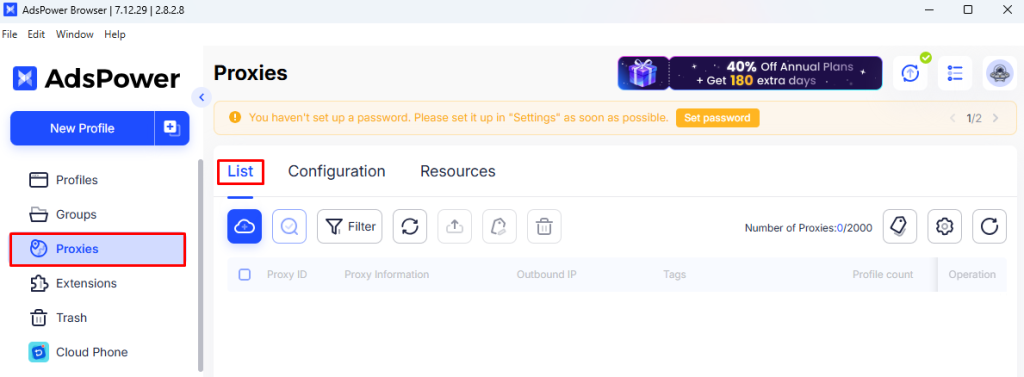
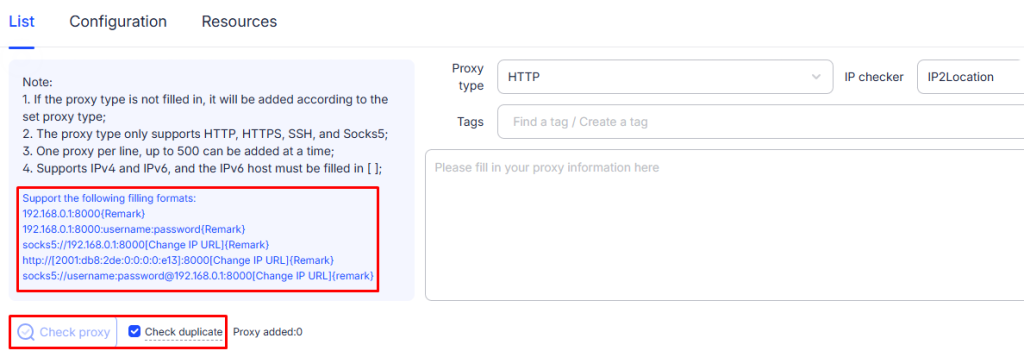
Click “Add Proxy.” Enter the full list in one of the supported formats. You can also check its availability using the built-in checker and scan the list for duplicates before saving.
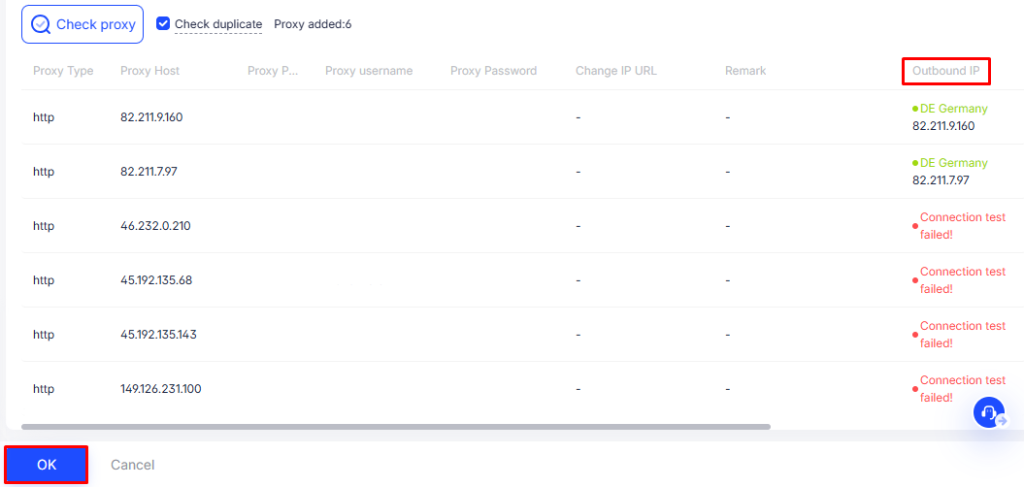
Run the check and review the results. Remove any IP addresses that fail, then confirm the pool. Once everything looks solid, click “OK.”
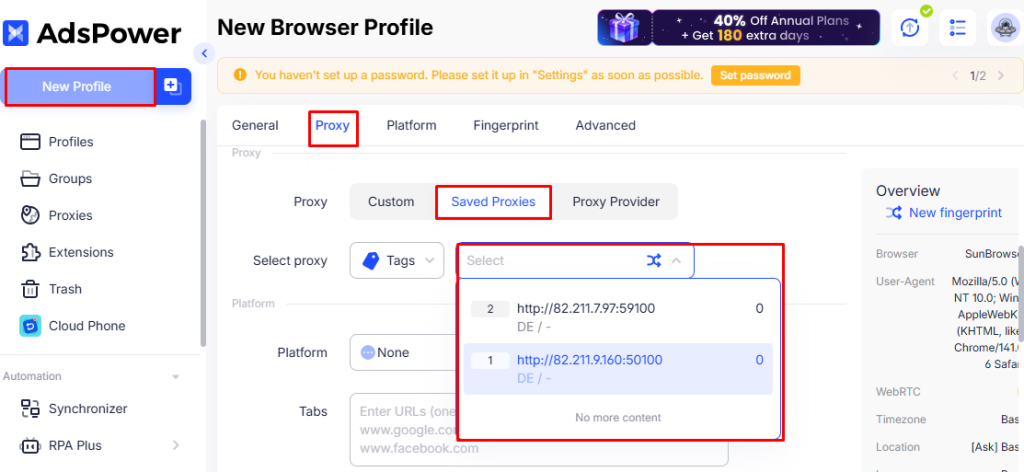
In the appropriate section, choose “Saved,” then pick the required address from the dropdown list.
It works best when you manage a small number of accounts, rarely replace IPs, or run one-off tests. It also helps when you want to set things up quickly without any preliminary steps.
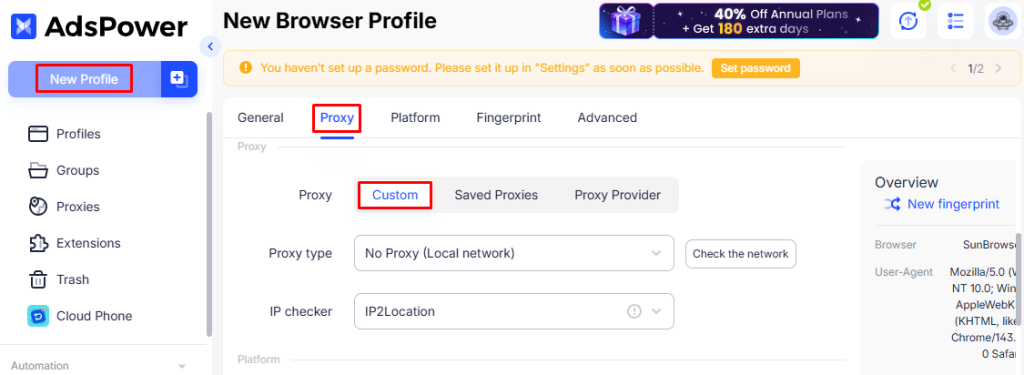
Click “New Profile” and fill in the required fields to shape the fingerprint. Then open the “Proxy” tab and select “Custom”.
Fill in the required fields: Host, Port, Username, and Password. If you use dynamic IP rotation, add the rotation URL in the last field. Once you complete the remaining sections, click “OK”.
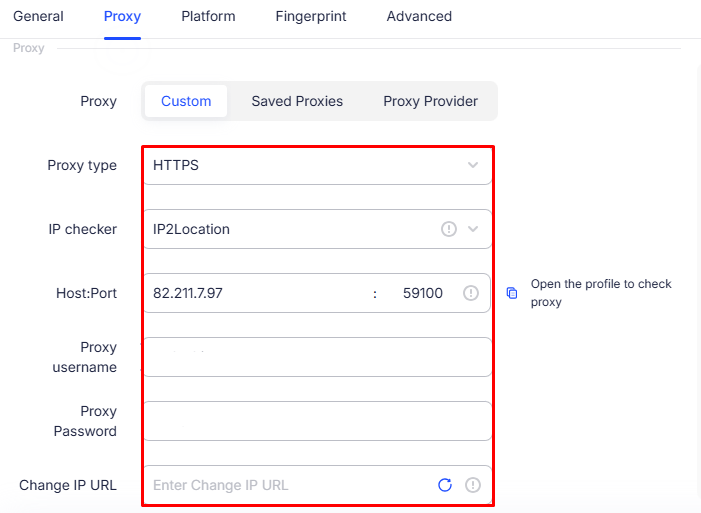
The browser supports several protocols, including HTTP, HTTPS, SOCKS5, and others tailored for specialized usage. We recommend reading our article “SOCKS5 vs. HTTPS Proxies” to determine which type fits your needs.
The platform is commonly used for browser fingerprinting protection, session isolation, and stealth profile management. Because of this, the quality and type of server you use can significantly affect stability, anonymity, and access.
The most recommended options include:
For optimal results, avoid using free or public solutions and choose elite proxies.
|
Description |
Possible causes |
Ways to resolve it |
|---|---|---|
|
No connection established |
The issue may stem from incorrect IP or port details, an unavailable server, or blocking by the platform or your provider. |
Re-check the data and its format, use a special checker, and request a replacement if it fails. Also ensure the port is open and not filtered by your ISP or firewall. |
|
The test passes, but profiles behave incorrectly |
The platform may block specific IPs or entire ASNs (common with datacenter ranges). You may also face slow connections or DNS-related issues. |
Switch to residential or mobile if DC is blocked. Adjust or change DNS. Check latency and try another region or provider. |
|
The proxy reports the wrong geo or language (geo mismatch) |
The provider may not guarantee precise location, the IP may belong to a VPN or hosting ASN, or the location may not match the fingerprint. |
Match the fingerprint to the geo (timezone/locale), and use residential or mobile IPs after checking it in several tools. |
|
IP leak (the site exposes real data) |
DNS or WebRTC leaks can reveal real data when some traffic goes out directly, or when extensions or a VPN interfere in the background. |
Verify leaks with external checkers, disable any third-party anonymizers, and switch to SOCKS5. |
|
Timeouts / “ERR_TIMED_OUT” |
High latency may come from an overloaded server or an exit node located too far from your region. |
Check the connection speed and use only dedicated servers |
|
A spike in CAPTCHAs, sudden bans, or forced logouts across accounts |
One IP is assigned to several sessions. |
Follow the rule “1 profile = 1 IP-address” and use the Manager to track each IP binding. |
A properly configured AdsPower proxy allows users to securely manage multiple profiles, protect their identity, and run browser sessions without being flagged. Avoid public intermediate servers and stick to premium sources to reduce the risk of errors and bans. You can also check out our article on Lalicat Antidetect as an alternative solution for multi-account workflows.


 Instagram
  Facebook
  TikTok
  Telegram
  YouTube
  Twitter
  Tinder
  Reddit
  LinkedIn
  Runescape
  Dofus
Dofus  Metin2
  Silkroad
  Margonem
  Minecraft
  Lineage 2
  WoW
WoW  Lords Mobile
  Travian
  Steam
Steam  Origin
  Google
  ScrapeBox
  Amazon
  Ebay
Ebay  Shopify
  Etsy
Etsy  Netflix
  Spotify
  Twitch
  Browsing